Vodafone menu for Android™
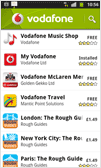
If you’ve got an Android™-powered smartphone, our menu makes it quick and easy to choose from our range of UK Vodafone apps on Android Market™. Just tap the Vodafone icon that appears on the market homescreen to browse and get the apps you want – plus lots of others we think you’ll love.

How to use the Vodafone menu
- Go to the main menu and choose ‘Market’.
- When you’re on the Market homepage, you’ll see a link called ‘Vodafone’ on the right-hand side of your screen.
- Just tap on this link to access a list of our UK apps including My Vodafone, Vodafone Music and Vodafone Travel. You’ll also find a selection of other apps we recommend.