Cybersecurity doesn’t have to be confusing or difficult if you follow these ten straightforward tips.
Feeling a bit overwhelmed by all the talk of scams, hacks, and data breaches? You’re not alone — and you’ve come to the right place. The good news is that a handful of simple habits can make a huge difference to your cybersecurity, and this guide walks you through all of them.
Whether you’re worried about phishing emails, not sure how strong your passwords really are, or just want peace of mind while your kids are online — don’t despair. Staying safe online is well within your reach.
This guide covers:
How to create passwords that actually work.
What two-factor authentication (2FA) is — and why it’s your best friend.
How to spot a phishing email or scam text before it’s too late.
Safe habits for public WiFi, social media, and online shopping.
Advice tailored to parents, remote workers, and older adults.
What to do if something does go wrong.
Have children at home? Head over to the Vodafone Digital Parenting hub for tailored advice on keeping younger users safe.
The scale of the problem
UK Finance's Annual Fraud Report 2024 (covering 2023 data) shows that fraud cost British consumers £1.17 billion in 2023. Since its launch in April 2020, the NCSC's Suspicious Email Reporting Service has received over 41 million reports of phishing scams from the British public — a powerful sign that awareness is growing. The threats are real, but so are the defenses.
Keep your software up-to-date
Those software update notifications can feel like a nagging nuisance, but please don’t ignore them. Software updates often include security patches that fix vulnerabilities — gaps in code that criminals actively look for and exploit. Setting your devices to update automatically makes that process as seamless as possible. If you need help on how to do this, these instructions for the most common computing platforms can help.
Don’t put off software updates on your devices for too long.
Don’t forget your router, too. If you’re on Vodafone Broadband, your Vodafone-branded router updates itself overnight automatically. But with some models, you may have to download and install updates manually.
Key action
Install software updates on every device you own as soon as you can — phone, laptop, and tablet. It doesn’t take long and closes the door on one of the most common entry points for cybercriminals.
Be careful with public WiFi networks
Free WiFi in a coffee shop or airport is handy, but it can also be risky. Many public hotspots aren’t encrypted — meaning someone else on the same network could potentially intercept what you’re doing online, a technique known as a man-in-the-middle attack. The NCSC advises caution whenever you’re using a network you don’t control.
The solution? Avoid doing anything sensitive on public WiFi, such as logging in to your bank or work accounts, if you can help it. If you have to, use a VPN (Virtual Private Network) — a service that scrambles your internet traffic so no one else can read it. Look for a reputable, well-reviewed provider. Alternatively, turn off WiFi and use your mobile data connection instead, which is more secure.
Key action
Never access anything sensitive, such as online banking or work systems, on public WiFi. Use a VPN, or switch to mobile data instead.
Use strong and unique passwords
This is one of the most impactful things you can do. Reusing the same password across multiple accounts is a common habit — and a costly one. If one site is breached, criminals will try your stolen password on all of your accounts – bank, email, and social media. Make sure every account has its own password and make them difficult to guess.
Aim for a password that mixes letters, numbers, and symbols. The NCSC also recommends a simple ‘three random words’ technique — something like PurpleBicycleMango7! — which is both memorable and surprisingly hard to crack. Although bear in mind that some online services might not accept a password constructed using the ‘three random words’ technique due to their own requirements on what a password should include. A password manager such as 1Password or Bitwarden can generate and store everything for you. Free built-in options are also available in iOS and some web browsers such as Google Chrome and Microsoft Edge.
Worth knowing
The NCSC has consistently found '123456' to be among the most widely used passwords in breached accounts in the UK. Credential reuse continues to be one of the top causes of account takeovers reported to the UK's national fraud reporting service.
Key action
Use a unique password for every account. Install – and use! – a password manager so you only need to remember one master password – it does the rest.
Your digital life: How to preserve it after you die
So much of our lives is lived online nowadays - all those photos, videos, social chats and blog posts are like the digital tapestries of our lives. But what happens to it all when we die? A little bit of planning now can ensure that your digital legacy is preserved for posterity.
Watch out for phishing emails and scam text messages
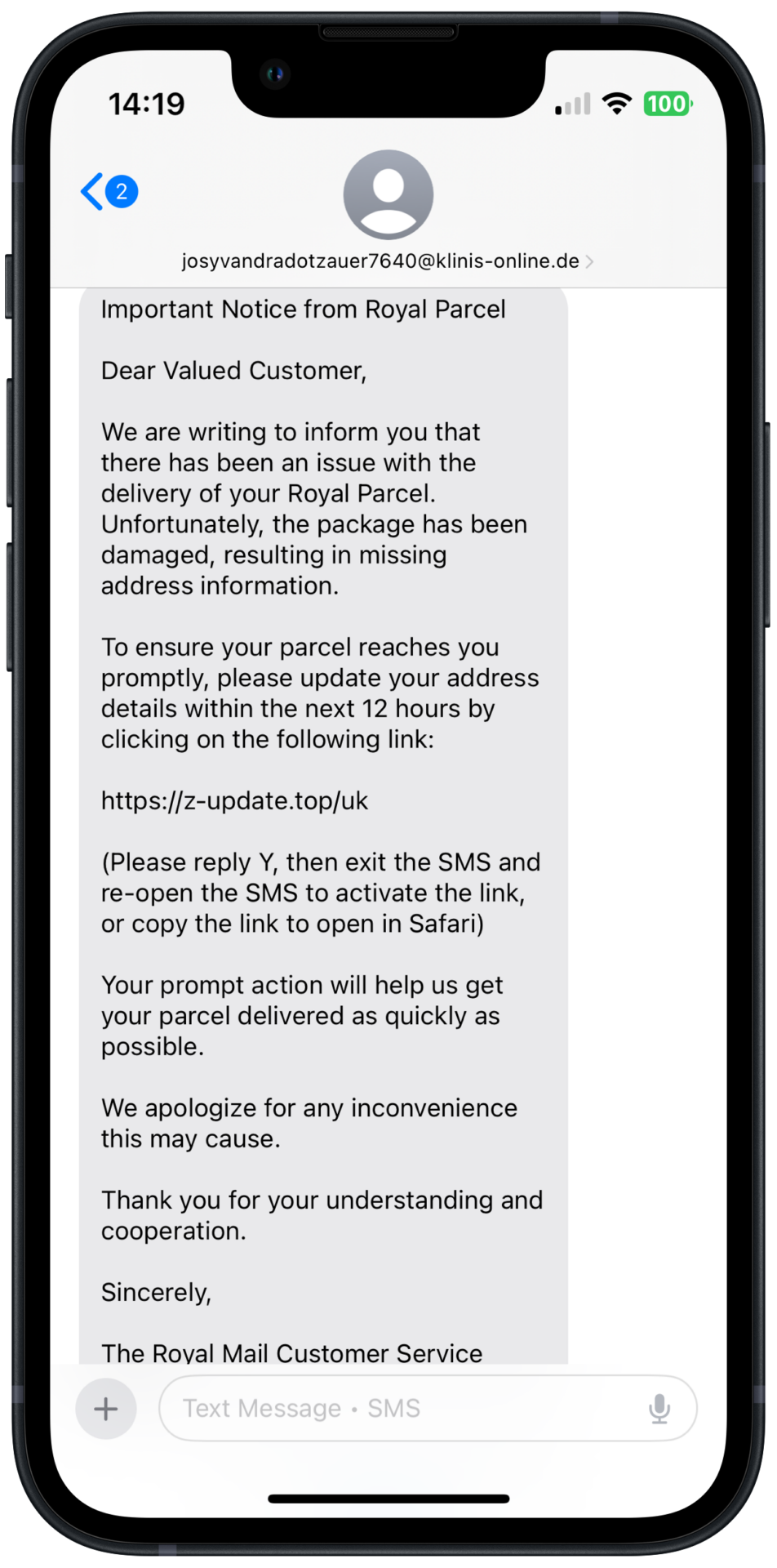
Phishing is when a criminal sends you an email pretending to be someone you trust — your bank, HMRC, or a delivery company — to trick you into handing over your password or personal details. The text message version is called smishing, and fraudulent phone calls are known as vishing. They’re all variations on the same scam: someone trying to catch you off guard.
Red flags to look for: urgency (‘Your account will be suspended!’), requests for personal information, and sender addresses that don’t quite match the real organisation. When in doubt, go directly to the company’s website rather than clicking any link in the message.
Worth knowing
Phishing is the most common form of cybercrime in the UK. Since the NCSC's Suspicious Email Reporting Service launched in April 2020, the British public has submitted over 41 million phishing reports — resulting in more than 217,000 scams being removed from the internet.
What to watch out for
Unexpected urgency. Misspelled sender addresses (e.g. [email protected]). Links that don't match the company's real website when you hover over them. Any request to confirm your password or financial details by email or text.
Forward suspicious emails to [email protected] and suspicious texts to 7726 — a free service run by Ofcom and the NCSC.
Turn on and use two-factor authentication (2FA)
Two-factor authentication (2FA) — also called two-step verification or multi-factor authentication — adds a second security check when you log in. After entering your password, you’re asked to confirm your identity one more time, usually via a code from an app or sent to your phone. Even if a criminal already has your password, they still can’t get in without that second step.
Look for ‘2FA’, or one of the other synonymous terms mentioned above, in the security settings of any app or website. Start with your email — it’s the master key to most of your other accounts. An authenticator app such as Google Authenticator, Microsoft Authenticator, or Authy is more secure than receiving codes by text, and works even when you have no signal.
Worth knowing
The NCSC states that enabling 2FA on your email account alone blocks the vast majority of automated account takeover attacks. It's one of the single most effective security measures available to everyday users.
Key action
Enable 2FA on your email account today — it takes mere minutes. Then work through your banking apps, online shopping sites and social media accounts.
The cybersecurity threats facing every small business
For every online threat, there’s a shield to protect your business and your customers – here's everything you need to know, including how Vodafone Business can help.
Your router is the front door to your entire home network. A surprisingly large number of routers still use factory-default admin credentials — many of which are publicly listed online and trivial for attackers to find. Take a few minutes to change yours to something strong and unique.
Check that your WiFi is using WPA2 or WPA3 encryption (you’ll find this in your router settings — if it says WEP, that’s outdated and worth updating). Also make sure that the latest firmware updates are installed, as manufacturers sometimes use these to fix security issues. Vodafone routers handle firmware updates automatically overnight, but if yours is from a different manufacturer then it’s worth checking how such updates are handled for your router.
Key action
Log in to your router's admin panel (the web address for this will usually be on the router itself or in the documentation), change the default password, and confirm WPA2 or WPA3 encryption is enabled.
WiFi and broadband router security: Everything you need to know
Protecting your broadband router from hackers is essential as it's the gateway to your entire online life. We explain what to do to ensure your WiFi router is as secure as it can be. The good news is that this only takes minutes.
This is one of the fastest-growing threats online. Criminals are now using artificial intelligence to clone voices and create convincing fake videos — known as deepfakes — of people you trust. You might receive a call that sounds exactly like a family member in trouble, or a video message that appears to be from a bank manager, asking for urgent action.
If you receive an unexpected request for money or sensitive information — even from a familiar voice or face — pause and verify. Call the person back on a number you already know. It’s also worth agreeing a secret ‘safe word’ with close family members that you can use in suspicious situations to confirm it’s really them.
Worth knowing
The NCSC has flagged AI-enabled fraud — including voice cloning and deepfakes — as a significant and growing priority concern. Vodafone Business has also noted that advancing AI tools are increasingly being exploited by fraudsters to make scams more convincing and harder to detect.
What to watch out for
Unexpected calls or videos creating urgency around money or personal details — even from voices or faces you recognise. Trust your instincts: if something feels off, it probably is. Hang up and call back on a known number.
AI-enhanced scams: how to protect yourself
Cybercriminals who use AI to defraud people sound intimidating and impossible to defend against, but protecting yourself is straightforward according to cybersecurity expert Dr Katie Paxton-Fear.
It’s easy to overshare without realising it. Your date of birth, home town, workplace, and even your holiday photos can be used by fraudsters to piece together enough information to impersonate you, answer your security questions, or time a burglary.
Set your profiles to private so only approved contacts can see your posts. Review which third-party apps have access to your accounts and revoke any you no longer use. Avoid posting your exact location in real time. Turn on 2FA (tip 5 above) for your accounts and then pay careful attention to any alerts you receive about any attempts to log in to your accounts — available on most platforms — so you’re notified straight away if someone tries to access your account from an unfamiliar device.
Key action
Spend a few minutes auditing your social media privacy settings this week: set your profiles to private, remove apps you don't use, and enable 2FA.
Shop and bank safely online
Before entering your card details anywhere online, check to ensure that the connection is encrypted. Look for ‘https’ in the address bar or the padlock icon. Some web browsers, such as Safari, put this information in other places, such as in a menu – if in doubt, check with the company that made it. Also make sure the web address is exactly right: fraudsters create convincing lookalike sites with addresses like amazon-offers.co.uk to catch people out. Wherever possible, pay by credit card rather than debit card for the extra protection you get under Section 75 of the Consumer Credit Act.
Key action
Check that instant transaction alerts are already enabled with your bank — many banks turn these on by default. If you spot a fraudulent payment, report it to your bank immediately to give yourself the best chance of recovering your money.
Add an extra layer of protection to your devices
Even with all of the above in place, a little extra protection can go a long way. If you’re on the Vodafone network, Vodafone Secure Net is worth considering. Built directly into the network itself, it automatically warns you about dangerous websites and dodgy download links before you even reach them. It can also detect and remove malware (malicious software) from Android devices.
Try Vodafone Secure Net free for three months — it runs quietly in the background so you don’t need to think about it. After the trial, it’s £1 per device per month.
What to do if something goes wrong
If you think your account or device has been compromised, act fast — but don’t panic. Here’s exactly what to do, in order:
Change your passwords, starting with your email account, then banking and social media. Do this from a clean, unaffected device if possible.
Enable 2FA on each account as you go.
Call your bank’s fraud line straight away if your financial details may have been exposed.
Scan your device for malware using reputable security software. Vodafone Secure Net can detect and remove malware from Android devices.
Check whether your email address has appeared in a data breach at haveibeenpwned.com — it’s free and takes seconds.
Report fraud to Report Fraud on 0300 123 2040. Forward phishing emails to [email protected] and suspicious texts to 7726.
If you've lost money to a scam
Contact your bank immediately and ask to speak to their fraud team. Then report to Report Fraud at reportfraud.police.uk or by calling 0300 123 2040. Time is critical — the sooner you act, the better your chances of recovering funds.
Frequently asked questions
What is phishing and how do I avoid it?
Phishing is when someone sends a fake email, text (smishing), or makes a phone call (vishing) pretending to be a trusted organisation — to steal your passwords or financial details. To reduce your chances of being taken in by phishing, treat unexpected messages that have a sense of urgency as a red flag, check sender addresses carefully, and go directly to a company’s official website rather than clicking links. Forward suspicious emails to [email protected] and texts to 7726.
What is two-factor authentication and how do I turn it on?
2FA adds a second verification step when you log in — usually a code from an authenticator app or sent to your phone. Start with your email account, as it protects all the other accounts linked to it. Use an authenticator app rather than SMS codes where possible — it’s much more secure.
How do I know if my personal data has been leaked?
Visit haveibeenpwned.com — a free service created by security researcher Troy Hunt. Enter your email address and it will tell you if it has appeared in any known data breaches. If it has, change the password for the affected account immediately and enable 2FA. You can also sign up for free alerts so you’re notified about future breaches.
Is public WiFi safe to use?
It can be, with the right precautions. Avoid sensitive tasks, such as logging in to banking or work accounts, on public WiFi. If you need to, use a VPN (Virtual Private Network), which encrypts your internet traffic. Or switch to your mobile data connection — it’s more secure than an open hotspot.
What should I do if I think I’ve been scammed?
Call your bank immediately, change your passwords from a secure device, and enable 2FA on any affected accounts. Report it to Report Fraud at 0300 123 2040, or online at reportfraud.police.uk. Forward any scam emails to [email protected] and texts to 7726. The sooner you act, the better your chance of limiting the damage.
This article was originally published in Ocotber 2022 and was last updated in April 2026.
Stay up-to-date with the very latest news from Vodafone by following us on Twitter and signing up for News Centre website notifications.